Release 2607: Non-custodial wallets, delegation of administrative permissions, and enhanced server security for external connections
 26
26 
Welcome to BitHide 2607! In this release, we expanded crypto wallet capabilities, improved external connection security, and simplified administrative delegation. Now, with BitHide, you can:
- Import existing crypto wallets and create new non-custodial wallets with a unique seed phrase and their own private keys.
- Improve the security of external connections with a single entry point through the standard HTTPS port 443.
- Delegate user management to designated employees without giving them access to the Wallet Owner's account.
Non-custodial wallets with a unique seed phrase
BitHide allows you to create an unlimited number of subwallets (merchants) that use BitHide private keys. You can now also import a crypto wallet using its seed phrase or create a new non-custodial wallet with a unique seed phrase.
In both cases, the wallet uses its own private keys, so you can use and restore it independently of other wallets.
Business value
- Independent control of funds. Non-custodial wallets use their own private keys and do not depend on BitHide private keys.
- Easy transition to BitHide. You can import an existing crypto wallet using its seed phrase and continue working with its addresses in the BitHide interface without transferring funds to a new wallet first.
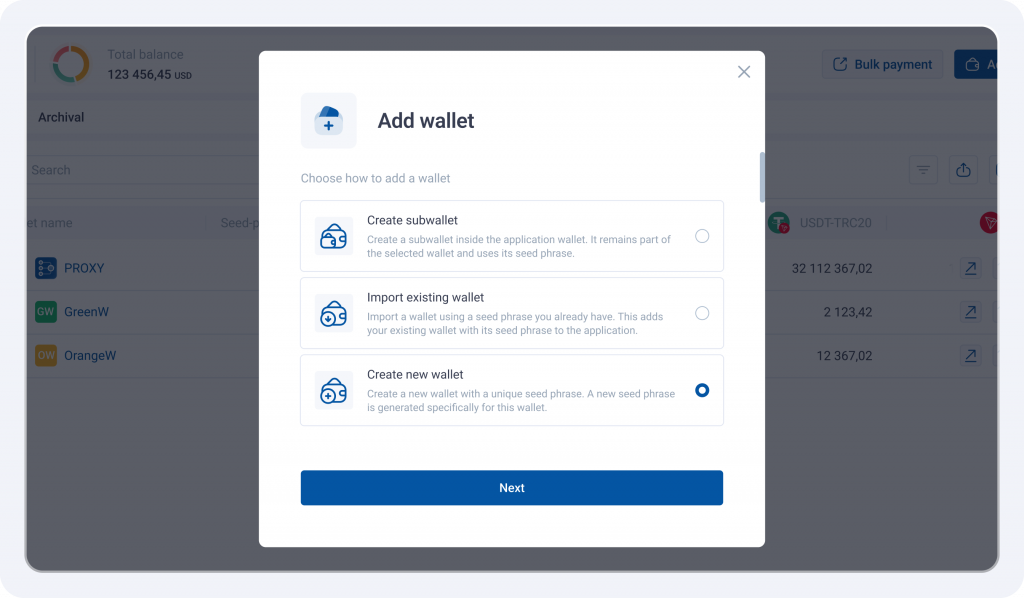
Create a new wallet
When you create a new non-custodial wallet, a unique seed phrase is generated for it. Before completing the setup, you need to save and confirm the seed phrase.
Import an existing wallet
You can import an existing crypto wallet into BitHide using its seed phrase. During the import, the wallet and its addresses are restored and then become available in the BitHide interface.
Wallet source
The wallet list now includes a Wallet source column. The source is indicated by an icon, and its name appears when you hover over it:
- Created in application – a subwallet that remains part of the BitHide wallet and uses its seed phrase;
- Added to application – a separate non-custodial wallet for use in BitHide. You can import it using an existing seed phrase or create it directly in the BitHide interface.
What you need to know
- The seed phrase is only available during wallet creation. Once the new wallet has been created, you cannot view its seed phrase again.
- Background import. During the import, you can minimize the modal and continue working in BitHide while the process continues in the background. If the session is interrupted, you will need to start the import again.
- Interrupted wallet creation. If the process is interrupted before completion, the new wallet will not be created. BitHide does not store users' seed phrases on its servers, so the generated seed phrase will not be saved, and you will need to start the wallet creation process again.
- Backward compatibility. Existing wallets will continue to work without any changes.
Single entry point for external connections
All external connections to BitHide now use a single standard HTTPS port (443) instead of multiple separate ports. BitHide receives incoming requests and routes them to the appropriate internal services.
To access a specific service, its exact route must be known – simply detecting an open port 443 is not enough. For example, https://server.example.com:443 specifies only the server and port, while accessing the required service requires its full address, such as https://server.example.com:443/service/example.
Business value
- Enhanced server security. Fewer entry points are exposed externally, reducing the information external scanning can reveal about BitHide's internal structure.
- Simplified integration. Using the standard HTTPS port 443 simplifies firewall and security policy configuration, BitHide deployment in corporate environments, and integration with external systems.
Flexible delegation of administrative permissions
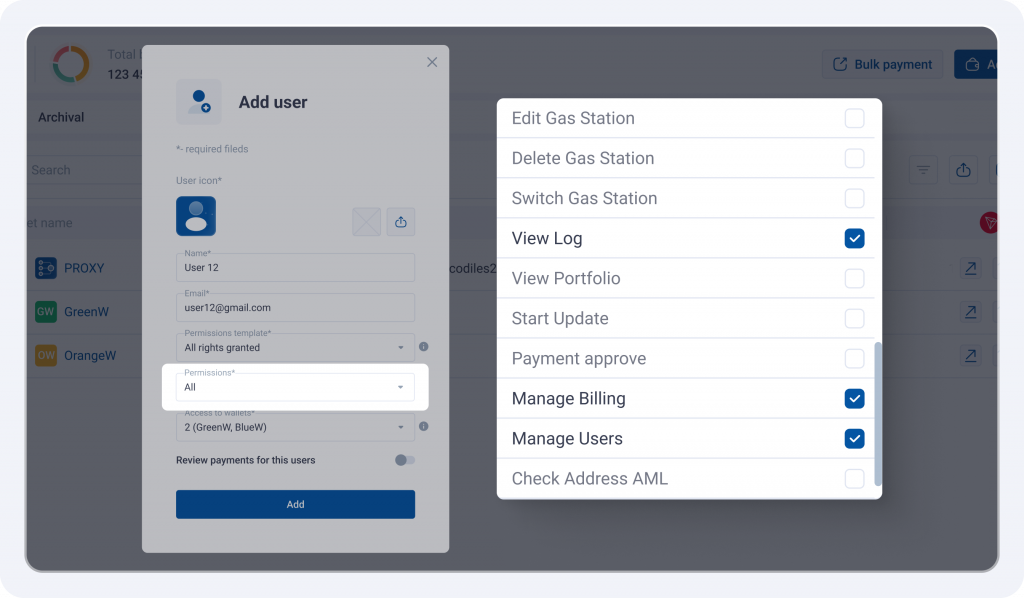
The Wallet Owner (Root) can now delegate user management to a designated employee without giving them full access to the Wallet Owner's account. This employee can create and configure other users and assign permissions within the wallets they can access.
Three administrative permissions are available and can be assigned independently:
- Manage Users;
- View Log;
- Manage Billing
Each employee can be granted only the permissions they need.
Business value
- Reduced operational workload. The Wallet Owner no longer needs to handle day-to-day user administration personally – these tasks can be delegated to a designated employee.
- Access control. Administrative tasks can be distributed among employees based on their responsibilities, with each employee receiving only the permissions and wallet access they need.
Manage Users
This permission allows an employee to manage other users within the wallets they can access: create and edit users, assign access permissions, block sign-in, reset user data, and perform other administrative actions.
Full access to the Wallet Owner's account is not granted: the employee cannot change its settings or perform actions on behalf of the Wallet Owner.
View Logs
This permission provides access to the Change Log and Generate Log File sections.
The employee can view records, use search, filtering, and sorting, export data, and generate and download log files.
Manage Billing
This permission provides access to the Billing page. The employee can top up the balance and purchase an AML package.
Thank you for choosing BitHide.
See you in future updates!